
Introduction: Understanding Application Development in 2026
Application development stands at the heart of innovation, business growth, and everyday convenience. Whether you’re ordering food, managing finances, collaborating with colleagues, or simply staying entertained, applications—commonly called “apps”—are the engines powering these experiences. But what exactly is application development, and how has it evolved to meet the demands of 2026?
Application development is the comprehensive process of designing, building, testing, deploying, and maintaining software applications that run on various platforms, including mobile devices, web browsers, desktops, and enterprise systems. This process is not just about writing code; it encompasses a structured methodology, user experience design, security, data management, and ongoing improvement. In 2026, the landscape is more dynamic than ever, with businesses investing over $524 billion annually in custom software solutions, and over 70% of organizations leveraging low-code and AI-assisted platforms to accelerate digital transformation.
This guide will demystify application development from the ground up. We’ll explore its fundamentals, types, methodologies, tools, and technologies, as well as key concepts like mobile app development, app development software, frontend and backend, AJAX programming, and frameworks such as AngularJS. Along the way, we’ll highlight real-world use cases, compare leading platforms, and examine the future trends shaping the industry.
Fundamentals of Application Development: The Modern SDLC
What Is the Software Development Life Cycle (SDLC)?
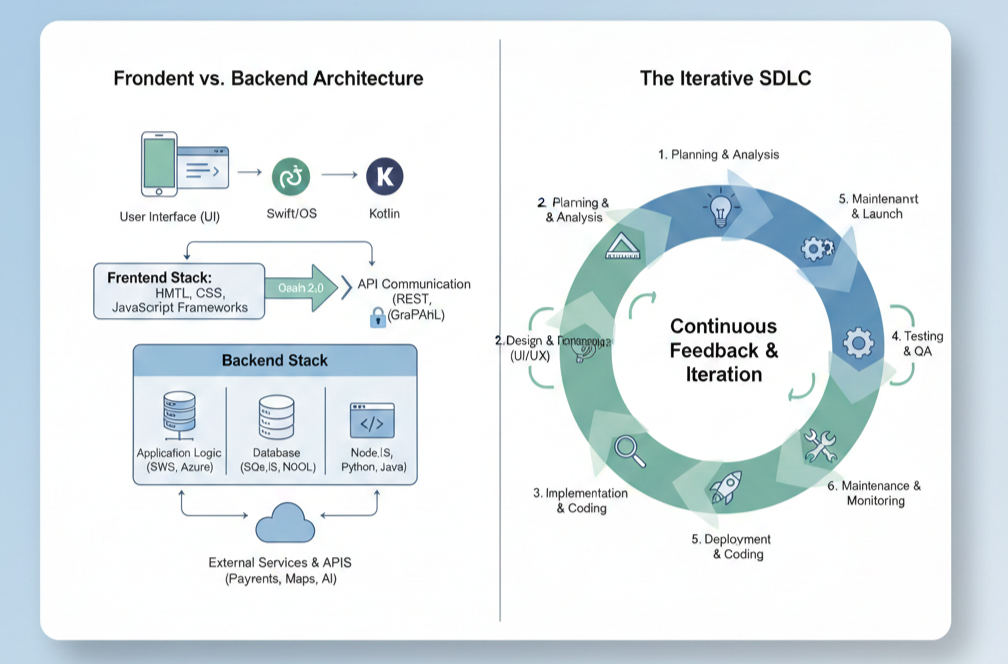
At its core, application development follows the Software Development Life Cycle (SDLC)—a structured framework that guides teams from idea to deployment and beyond. The SDLC ensures that applications are built systematically, tested thoroughly, and maintained effectively. In 2026, the SDLC has evolved to integrate agile methodologies, DevOps practices, and AI-powered tools, emphasizing rapid prototyping, continuous integration, and user-centered design.
The Five-Stage SDLC in 2026
- Planning & Research: Engage stakeholders, analyze competitors, define technical requirements, allocate resources, and map risks.
- Design & Prototyping: Create user journey maps, wireframes, interactive prototypes, and plan technical architecture.
- Code Development: Build frontend and backend components, leverage AI-assisted coding, and manage code with version control.
- Testing & Optimization: Implement automated and manual testing, performance tuning, security checks, and user acceptance testing.
- Release & Continuous Maintenance: Deploy using CI/CD pipelines, monitor performance, gather user feedback, and update regularly.
This modern SDLC is iterative and collaborative, with feedback loops at every stage to ensure quality, security, and alignment with user needs.
Mobile App Development: Platforms, Tools, and Approaches
Overview of Mobile App Development
Mobile application development is a specialized branch of app creation focused on delivering seamless, high-performance experiences on smartphones and tablets. In 2026, mobile apps are integral to e-commerce, healthcare, finance, entertainment, and more.
Key Mobile Platforms
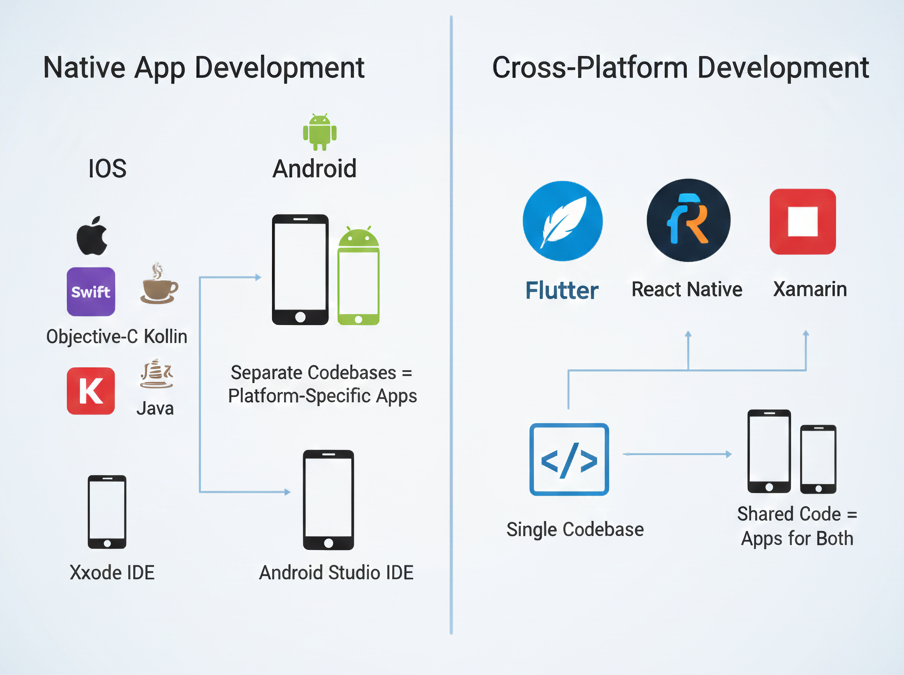
- Android Application Development: Uses Kotlin or Java with Android Studio. Android dominates the global market share, especially in emerging markets.
- iOS Application Development: Uses Swift or Objective-C with Xcode. iOS excels in high-income regions and offers a premium user base.
Cross-Platform and Hybrid Development
Frameworks like Flutter (Dart), React Native (JavaScript), and Xamarin (C#) enable developers to write one codebase for both Android and iOS, reducing time and cost. Progressive Web Apps (PWAs) and hybrid solutions further expand reach by blending web and native capabilities.
Mobile Application Platforms and Tools
Modern mobile application platforms offer drag-and-drop interfaces, AI integration, and cloud-based deployment. Leading platforms in 2026 include:
- Flutter: Google’s UI toolkit for building natively compiled apps across platforms.
- React Native: Backed by Meta, popular for rapid development and strong community support.
- Xamarin: Integrates with .NET for enterprise-grade cross-platform apps.
- BuildFire, Appy Pie, OutSystems: No-code/low-code platforms democratizing app creation.
Choosing the Right Approach
- Native: Best for performance, deep hardware integration, and platform-specific features.
- Cross-Platform: Ideal for rapid market entry and budget-conscious projects.
- Low-Code/No-Code: Empowers non-developers to build apps quickly for internal use or MVPs.
App Development Methodologies: Agile, DevOps, and Joint Application Design
Agile and Scrum
Agile methodologies emphasize iterative development, continuous feedback, and cross-functional collaboration. Scrum is a popular Agile framework that breaks work into sprints, enabling rapid delivery and adaptation to changing requirements.
Benefits of Agile in App Development
- Faster time-to-market
- Improved quality through continuous testing
- Greater client satisfaction via regular demos
- Enhanced transparency and adaptability
DevOps and Continuous Delivery
DevOps integrates development and operations, automating deployment, monitoring, and scaling. Continuous Integration/Continuous Deployment (CI/CD) pipelines ensure that code changes are tested and released rapidly, reducing errors and downtime.
Joint Application Design (JAD)
Joint Application Design (JAD) is a collaborative methodology that brings together stakeholders, developers, and end-users in structured workshops to define requirements and design solutions. JAD accelerates development, improves quality, and ensures that the final product aligns with business needs.
JAD Process Participants
- Facilitator: Manages sessions and ensures focus.
- IT Representatives: Provide technical guidance.
- End-Users: Offer business knowledge and requirements.
- Scribe: Documents decisions and action items.
Advantages and Challenges
JAD fosters teamwork, reduces risks, and accelerates progress. However, aligning diverse opinions and dedicating time to workshops can be challenging.
Key Concepts: Frontend, Backend, AJAX, and AngularJS
What Is Backend and Front End?
Frontend (client-side) is what users see and interact with—layouts, buttons, forms, and visual elements. It’s built with technologies like HTML, CSS, JavaScript, and frameworks such as React, Angular, and Vue.js.
Backend (server-side) handles data processing, storage, authentication, and business logic. It uses languages like Python, Java, Node.js, and frameworks like Django, Express, and Spring Boot. The backend communicates with databases and exposes APIs for the frontend to consume.
Full-stack development combines both frontend and backend skills, enabling developers to build complete applications from end to end.
Comparison Table: Frontend vs Backend
| Aspect | Frontend | Backend |
| Focus | User interface, UX | Data processing, business logic |
| Technologies | HTML, CSS, JS, React, Angular | Python, Java, Node.js, Django |
| Runs On | Browser (client) | Server |
| Key Concerns | Responsiveness, interactivity | Security, scalability, APIs |
What Is AJAX Programming?
AJAX (Asynchronous JavaScript and XML) is a technique that allows web pages to communicate with servers asynchronously, updating content without reloading the entire page. AJAX uses the XMLHttpRequest object in JavaScript to send and receive data in the background, enabling dynamic, responsive web applications.
Applications of AJAX
- Real-time updates (e.g., chat apps, notifications)
- Dynamic form submissions
- E-commerce filtering and sorting
Advantages and Limitations
AJAX enhances interactivity and performance but introduces complexity, SEO challenges, and potential security risks if not implemented properly.
What Is AngularJS?
AngularJS is a popular open-source JavaScript framework for building interactive single-page applications (SPAs). It transforms static HTML into dynamic content, supports two-way data binding, and follows the Model-View-Controller (MVC) architecture.
Key Features
- Data Binding: Synchronizes data between model and view.
- Directives: Extend HTML with custom elements and behaviors.
- Dependency Injection: Promotes modular, maintainable code.
- Routing: Enables client-side navigation in SPAs.
AngularJS is widely used for dynamic forms, real-time dashboards, and collaborative apps. Its ecosystem continues to evolve, with Angular (the successor) introducing advanced features for performance and scalability.
App Development Software and Tools: The 2026 Landscape
Essential App Development Software
Modern app development software streamlines the creation, testing, and deployment of applications across platforms. In 2026, the market is rich with options catering to different needs:
Top App Development Tools
- Android Studio: Official IDE for Android development.
- Xcode: Apple’s IDE for iOS/macOS development.
- Flutter: Google’s cross-platform UI toolkit.
- React Native: JavaScript framework for cross-platform apps.
- Mendix, OutSystems, Appian: Leading low-code platforms for rapid business app creation.
- Strapi: Headless CMS for content-driven apps.
- Apidog: Visual API design and testing.
- Scaledrone: Real-time messaging and presence detection.
- Serverless Framework: Simplifies deployment to cloud functions.
Features to Look For
- Drag-and-drop UI builders
- Code editors with AI assistance
- Integrated testing and debugging tools
- Version control (e.g., Git)
- Cloud deployment and monitoring
- Security and compliance features
No-Code/Low-Code Revolution
By 2026, up to 70% of new applications will be built on no-code or low-code platforms, empowering business users and reducing development cycles by up to 90%. These platforms offer visual interfaces, pre-built templates, and seamless integration with APIs and databases.
Android Application Development: Trends, Tools, and Best Practices
Why Android Development Matters
Android application development remains crucial due to Android’s global dominance, especially in emerging markets. In 2026, Android apps benefit from:
- Growing smartphone penetration
- AI and machine learning integration
- 5G expansion for real-time features
- Cross-platform frameworks (Flutter, MAUI)
- Kotlin is the preferred language
Key Tools and Frameworks
- Android Studio: Feature-rich IDE with emulator, code analysis, and performance profiling.
- Kotlin: Modern, concise, and safe language for Android.
- Flutter: Enables Android and iOS apps from a single codebase.
- Jetpack Compose: Declarative UI toolkit for modern Android apps.
Best Practices
- Optimize for diverse devices and screen sizes.
- Integrate AI features with TensorFlow Lite or ML Kit.
- Prioritize security with end-to-end encryption and biometric authentication.
- Leverage 5G for enhanced user experiences.
iOS Application Development: Ecosystem, Languages, and Strategies
The iOS Advantage
iOS application development targets Apple’s premium user base, known for higher spending and strong brand loyalty. iOS apps excel in markets like the US, Western Europe, and Japan.
Core Tools and Languages
- Xcode: Apple’s official IDE with a simulator and visual debugger.
- Swift: Modern, safe, and fast language for iOS.
- Objective-C: Legacy support for older apps.
- SwiftUI: Declarative UI framework for building adaptive interfaces.
Development Approaches
- Native: Best for performance, security, and deep integration with Apple’s ecosystem.
- Cross-Platform: Use Flutter, React Native, or Xamarin for a broader reach.
Key Considerations
- Adhere to Apple’s strict App Store guidelines.
- Optimize for device consistency and the latest iOS versions.
- Integrate features like Face ID, Apple Pay, and Siri.
- Prioritize privacy and data protection.
Cross-Platform and Hybrid App Creation: Efficiency and Reach
Why Go Cross-Platform?
Cross-platform development allows teams to build apps for multiple platforms (Android, iOS, web) from a single codebase, reducing time and cost by up to 70%. This approach is ideal for startups, e-commerce, and social apps, prioritizing rapid market entry.
Leading Frameworks
- Flutter: Compiles to native code, offers rich widgets, and excels in performance.
- React Native: JavaScript-based, strong community, and easy integration with web technologies.
- Xamarin: C# and NET-based, favored in enterprise settings.
- PWAs: Browser-based, installable, and work offline.
Pros and Cons
| Aspect | Cross-Platform | Native |
| Code Reuse | High | Low |
| Performance | Near-native | Optimal |
| Development Time | Shorter | Longer |
| Access to Features | Some limitations | Full access |
| Maintenance | Easier | More complex |
Choose cross-platform for speed and consistency; opt for native when performance and deep integration are critical.
Backend Architectures and APIs: Powering Modern Apps
Backend Architectures
Modern apps rely on robust backend architectures to handle data, business logic, and integrations. Key patterns in 2026 include:
- Microservices: Modular, independently deployable services for scalability and fault isolation.
- Event-Driven: Real-time responsiveness for IoT, analytics, and notifications.
- Serverless: Automatic scaling and cost optimization, focusing on business logic rather than infrastructure.
APIs: The Glue of Application Development
APIs (Application Programming Interfaces) enable communication between frontend and backend, as well as integration with third-party services. Modern API design emphasizes:
- RESTful principles for resource-oriented endpoints
- GraphQL for flexible, efficient data queries
- Secure authentication (OAuth 2.1, JWT)
- Versioning and documentation for maintainability
APIs are central to enabling mobile apps, web clients, and integrations with cloud services.
Databases and Data Management: SQL, NoSQL, and Beyond
Choosing the Right Database
Data management is foundational to application development. In 2026, teams choose between:
- SQL (Relational): Structured, ACID-compliant, ideal for financial and transactional systems (e.g., MySQL, PostgreSQL).
- NoSQL (Non-relational): Flexible schemas, high scalability for real-time analytics and content management (e.g., MongoDB, Cassandra).
- NewSQL: Combines SQL’s consistency with NoSQL’s scalability for cloud-native apps (e.g., Google Spanner, CockroachDB).
Comparison Table: SQL vs NoSQL vs NewSQL
| Feature | SQL | NoSQL | NewSQL |
| Data Structure | Relational | Flexible | Relational |
| Scalability | Vertical | Horizontal | Horizontal |
| Consistency | Strong (ACID) | Eventual | Strong (ACID) |
| Use Cases | Banking, ERP | IoT, CMS | SaaS, fintech |
The choice depends on data complexity, scalability needs, and consistency requirements.
Security in Application Development: Best Practices for 2026
The Zero Trust Model and DevSecOps
Security is no longer an afterthought. The Zero Trust model assumes no entity is trusted by default, enforcing continuous authentication, least privilege access, and real-time monitoring. DevSecOps integrates security checks throughout the SDLC, using automated tools for static and dynamic analysis.
Essential Security Practices
- Secure SDLC: Embed security from planning to deployment.
- Threat Modeling: Identify and mitigate vulnerabilities early.
- Encryption: Protect data in transit and at rest (TLS, AES-256).
- Authentication: Use multi-factor and biometric methods.
- API Security: Validate inputs, restrict endpoints, and monitor traffic.
- Continuous Testing: Regular scans, penetration testing, and monitoring.
- Compliance: Adhere to regulations (GDPR, HIPAA, SOX).
Security is a shared responsibility, requiring a culture of awareness and proactive defense.
Testing and Quality Assurance: Ensuring Reliability
Automated and Manual Testing
Comprehensive testing ensures that applications meet quality standards and perform reliably. In 2026, testing strategies include:
- Unit Testing: Validate individual components.
- Integration Testing: Ensure system interoperability.
- End-to-End (E2E) Testing: Simulate real user scenarios across the stack.
- Performance Testing: Assess speed and resource usage.
- Security Testing: Identify vulnerabilities and compliance gaps.
- User Acceptance Testing (UAT): Gather feedback from real users.
Continuous Integration/Continuous Deployment (CI/CD)
Automated pipelines run tests on every code change, catching issues early and enabling rapid, reliable releases.
Deployment, Monitoring, and Maintenance: Keeping Apps Healthy
Deployment Strategies
Modern deployment leverages CI/CD pipelines, automated rollbacks, and advanced strategies like blue-green and canary deployments to minimize risk and downtime.
- Blue-Green Deployment: Two identical environments; switch traffic after successful testing.
- Canary Deployment: Gradually roll out updates to a subset of users, monitoring for issues.
Monitoring and Analytics
Continuous monitoring tracks performance, user behavior, and system health. Tools like Google Analytics, New Relic, and custom dashboards provide actionable insights.
Maintenance
- Corrective: Bug fixes and troubleshooting.
- Perfective: Performance improvements and optimizations.
- Adaptive: Updates for compatibility and new requirements.
- Security: Regular audits and patching.
Proactive, AI-driven maintenance predicts and resolves issues before they impact users.
AI and No-Code/Low-Code in App Development
AI-Assisted Development
AI coding assistants (e.g., GitHub Copilot) accelerate development, reduce errors, and improve code quality. AI also powers features like chatbots, personalization, and predictive analytics within apps.
No-Code/Low-Code Platforms
These platforms democratize app creation, enabling business users to build functional applications without deep programming knowledge. They are ideal for rapid prototyping, internal tools, and MVPs.
Benefits
- Faster time-to-market
- Lower development costs
- Empowerment of non-technical teams
- Seamless integration with APIs and cloud services
UX/UI Design Principles for Apps: Mobile-First and Beyond
Mobile-First and User-Centered Design
Mobile-first design starts with the smallest screen, focusing on essential features and progressive enhancement for larger devices. Key principles include:
- Simplicity and clarity
- Visual hierarchy and intuitive navigation
- Responsive layouts and adaptive themes
- Accessibility for all users
- Micro-interactions and gesture-based navigation
- Dark mode and adaptive contrast
Accessibility and Inclusivity
Legal requirements and best practices mandate support for screen readers, keyboard navigation, and high-contrast modes.
Personalization and Engagement
AI-driven personalization, real-time feedback, and engaging animations enhance user satisfaction and retention.
App Monetization and Business Models
Proven Monetization Strategies
In 2026, app monetization is integrated from day one, with strategies including:
- In-App Advertising: Display ads without disrupting user experience.
- In-App Purchases: Sell virtual goods, premium features, or content.
- Subscriptions: Offer recurring access to premium services.
- Freemium Models: Free basic features with paid upgrades.
- Transaction Fees: Charge for facilitating services or payments.
- Data Licensing: Monetize anonymized user data (with consent).
- Affiliate Marketing: Earn commissions for referrals.
- E-commerce Integration: Enable direct purchases within the app.
Choosing the Right Model
The optimal strategy depends on app functionality, target audience, and long-term vision. Diversifying revenue streams and complying with privacy regulations are best practices.
Real-World Use Cases and Case Studies
Industry Examples
- Healthcare: AI-powered diagnostic apps, telemedicine platforms, and patient management systems.
- Finance: Mobile banking, trading platforms, and personal finance trackers.
- Retail: E-commerce apps with AR try-ons and personalized recommendations.
- Education: Virtual classrooms, learning management systems, and interactive content.
- Social Media: Real-time messaging, content sharing, and community building.
Success Stories
- Domino’s: Redesigned app led to a 23% increase in conversion rate.
- Adidas: Mobile app expansion resulted in 2 million downloads and 500K new users.
- KFC: Food delivery app drove a 22% increase in conversion and 60% more repeat purchases.
These examples highlight the transformative impact of well-executed application development.
Career Paths and Roles in Application Development
Key Roles
- Product Owner/Project Manager: Defines vision and manages execution.
- Business Analyst: Gathers requirements and maps workflows.
- Frontend Developer: Builds user interfaces and ensures responsiveness.
- Backend Developer: Handles server-side logic, databases, and APIs.
- Full-Stack Developer: Combines frontend and backend expertise.
- QA Engineer: Tests and validates application quality.
- DevOps Engineer: Manages deployment, scalability, and infrastructure.
- UI/UX Designer: Crafts intuitive, engaging user experiences.
- Data Engineer: Designs data pipelines and analytics solutions.
Building Effective Teams
Team structure depends on project complexity, stage, and required expertise. Agile, cross-functional teams with clear communication and ownership deliver the best results.
Comparisons: Android vs iOS vs Cross-Platform
| Aspect | Android | iOS | Cross-Platform |
| Market Share | Largest globally | Premium, affluent users | Broad reach |
| Development Time | Longer (fragmentation) | Faster (consistency) | Shortest (single codebase) |
| Monetization | Ad-supported, freemium | Subscriptions, in-app purchases | Flexible |
| Security | Open, more vulnerable | Closed, highly secure | Depends on the framework |
| Design | Customizable | Consistent, polished | Consistent, customizable |
| Maintenance | More complex | Easier | Simplified |
Choose based on the target audience, business goals, and required features.
Emerging Trends and the Future of Application Development
AI and Automation
AI will continue to automate coding, testing, personalization, and analytics, enabling smarter, more adaptive applications.
No-Code/Low-Code Expansion
Democratization of development will empower more users to create apps, accelerating innovation and reducing costs.
Cloud-Native and Serverless Architectures
Cloud platforms and serverless models will drive scalability, resilience, and cost efficiency.
Security and Privacy
Zero Trust, DevSecOps, and compliance with evolving regulations will be non-negotiable.
UX/UI Innovation
Mobile-first, gesture-based, and accessible design will define user experiences. Liquid Glass, glassmorphism, and adaptive themes will shape visual trends.
Super Apps and Modular Architectures
Super apps offering multiple services and modular, composable architectures will become mainstream.
Sustainability
Optimized code, reduced resource usage, and digital sustainability will gain importance.
Conclusion
Application development in 2026 is a dynamic, multidisciplinary field that blends creativity, technical expertise, and strategic thinking. From mobile app development and cross-platform frameworks to AI-driven automation and no-code platforms, the possibilities are vast and ever-expanding. Success hinges on understanding user needs, choosing the right tools and methodologies, prioritizing security and quality, and staying agile in the face of change.
Whether you’re a business leader, developer, designer, or aspiring app creator, mastering the fundamentals and embracing emerging trends will empower you to build applications that delight users, drive value, and shape the future.
Application development is not just about building software—it’s about creating experiences, solving problems, and unlocking new opportunities in a connected world.